User Manual
Boon Tap
Introducing Under-the-Counter Water Purifier
Everything you need to install, operate, and maintain your Boon Tap — powered by UltraOsmosis™ Filtration and WaterAI™.
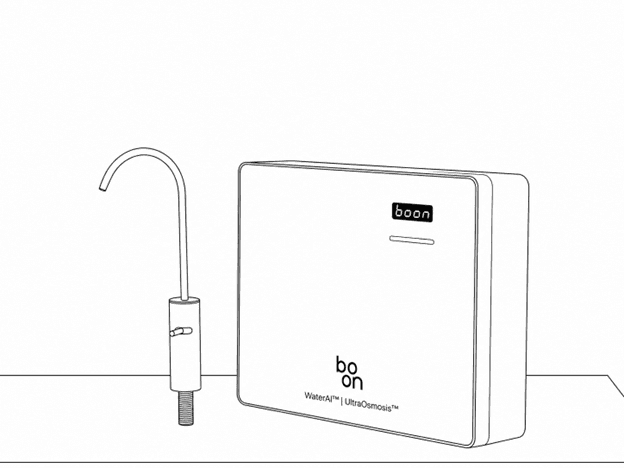
Introduction
About Boon
Boon is an Indian water technology innovator building the daily wellness standard for modern homes and spaces. Born from a simple idea to provide safe drinking water, the company, originally founded as Swajal, has evolved into a leading innovator in advanced water purification and real-time AI-enabled quality monitoring systems for homes, offices, hospitality, and commercial spaces.
With patented technologies like UltraOsmosis™ Filtration and WaterAI™, Boon combines commercial-grade purification, smart IoT analytics, and meaningful enhancement to deliver water that performs, adapts, and proves itself every day.
Every product is designed and manufactured in-house, built to hold under real use, and backed by proof you can see. Trusted by over 400 corporates and hospitality properties across 11 countries, Boon is redefining how people drink, manage, and experience water. Starting at home.
About This Manual
This manual provides essential guidance for the safe installation, operation, and maintenance of the Boon Tap Under-the-Counter Water Purifier, helping you use the product correctly and ensure optimal performance over time.
Please read it carefully before installing or using the product and retain it for future reference; following all instructions and safety guidelines will ensure proper functioning and personal safety. This manual does not cover detailed servicing or repair procedures, and all installation, servicing, and internal maintenance must be carried out only by authorized Boon service personnel, as improper installation or unauthorized servicing may affect performance and void the warranty.
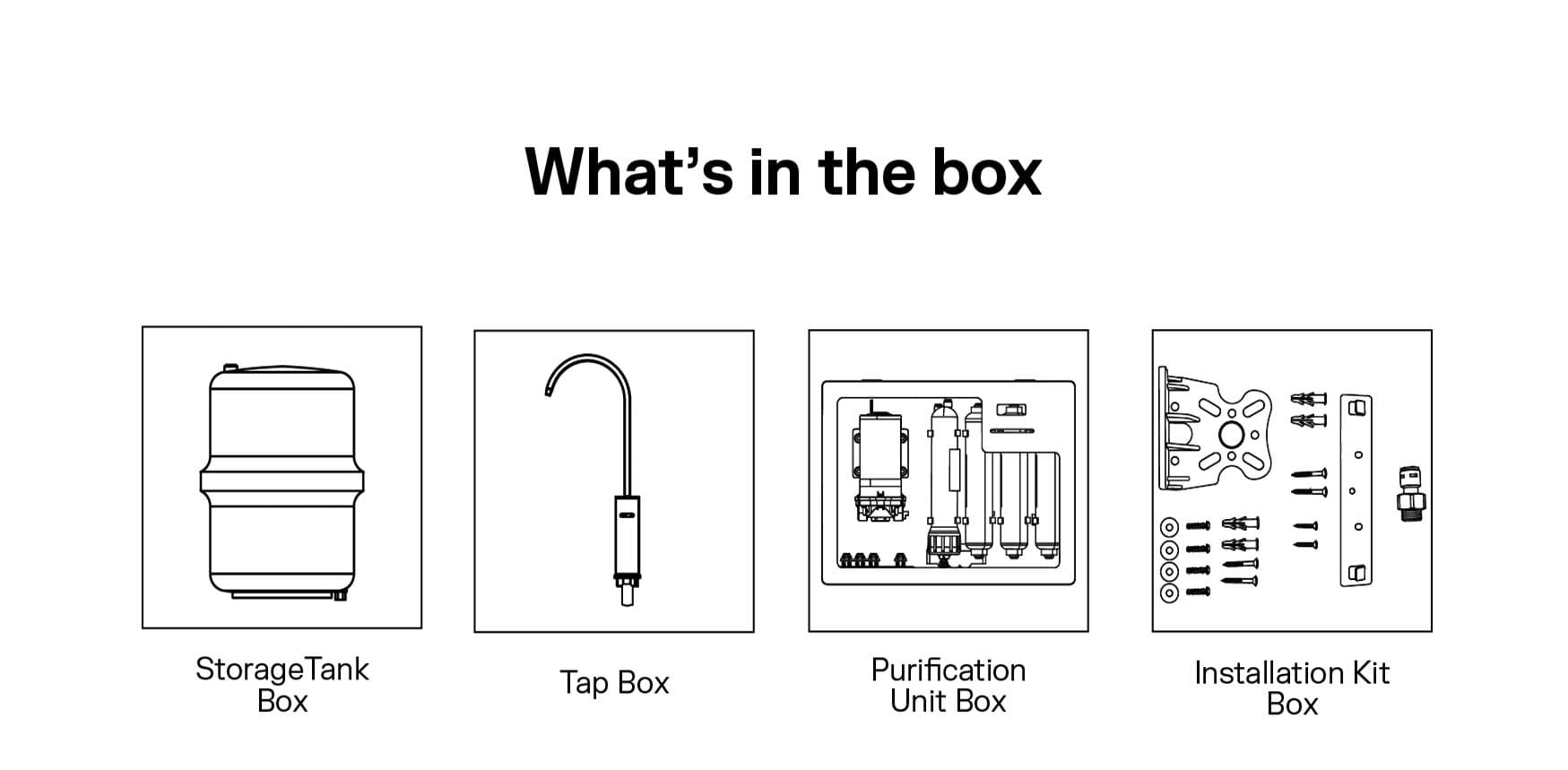
What's in the Box
Everything included with your Boon Tap for installation and use. Please verify all items before installation.
| Category | Item | Description |
|---|---|---|
| Main Components | Purification Unit Box | Contains all internal filters and the RO membrane |
| Storage Tank (8L) | Stores purified water and maintains flow | |
| Stainless Steel Tap | Tap for dispensing purified water | |
| Pre-Filter | Pre-Filter Cartridge (10") | PP melt-blown cartridge |
| Pre-Filter Housing (10") | With 3/8" input and output elbow | |
| Installation Accessories | 3/8" Pipe – 1.5 m | Food-grade tubing for purified water and tank/tap connections |
| 1/4" Pipe (white) – 2.2 m | Food-grade tubing for purified water and tank/tap connections | |
| 1/4" Pipe (blue) – 1.5 m | Food-grade tubing for purified water and tank/tap connections | |
| Ball Valve – 3/8" | For water inlet connection | |
| FTA – 1/2" × 3/8" | Adapter for plumbing connection | |
| Elbow Connectors | 1/4" and 3/8" elbows for tubing connections | |
| Box Mounting Clamp | For securing the purification unit | |
| Screws & Wall Plugs | Self-tapping screws, bolts, and washers |
Safety Instructions
Important precautions to ensure safe installation, operation, and maintenance of the purifier. Boon (Swajal Water Pvt. Ltd.) will not be responsible for any damages that occur due to mishandling or non-compliance with the following safety instructions.
Location Safety
- No flammables: Never store or use gasoline, kerosene, or any flammable liquids near the Boon Tap. Risk of fire and explosion.
- Water supply proximity: Ensure that both the inlet water supply and drainage point are within 1.5 meters of the unit's installation site.
- Hygiene requirement: Keep the installation area clean and dry to prevent pest infestation.
- Avoid carpeted floors: Water spills may damage carpets. If installation on carpet is unavoidable, place a water tray beneath the unit.
- Stable placement: Install on a flat, level surface to prevent tipping or vibration damage.
Electrical Safety
- Mandatory grounding: Boon Tap must always be properly grounded. Never cut, remove, or bypass the grounding pin on the plug.
- Proper outlet use: Plug directly into a dedicated wall outlet. Do not use extension cords, multiple adapters, or outlets controlled by wall switches.
- Voltage compatibility: Designed for 230V ~ 50Hz residential supply. Incorrect voltage may cause damage or fire.
- Continuous power: Keep power switched on at all times. Disconnecting power repeatedly may cause malfunction of internal components.
- Wet hand hazard: Never plug or unplug with wet hands — risk of electric shock.
- Cord care: Do not bend, pull, or place heavy objects on the cord. Replace immediately if damaged.
Installation Safety
- Professional installation required: All water pipe connections must be sized, fitted, and maintained by a Boon-authorized technician.
- Check requirements: Installer must confirm that all plumbing and electrical requirements are met before first use.
- Do not modify: Never attempt to disassemble, or bypass system components yourself.
- Correct leveling: Install on a flat, stable surface to ensure proper operation and avoid vibration damage.
- Do not attempt internal electrical repairs; contact authorized service.
Water Safety
- Always perform the initial flush before first use and after long inactivity.
- Do not operate without sufficient water supply to the unit.
- If abnormal taste, odor, or color is noticed, stop using immediately and check filter status on the app.
Emergency Situations
- If smoke, sparks, burning smell, or unusual noise occurs, switch off and unplug immediately.
- If water leaks into electrical parts, disconnect power and call service support.
- Never restart the unit after a short circuit or major leak until inspected by a qualified technician.
Installation Requirements
Please ensure that the following conditions are met under your kitchen sink / installation area before installation of the Boon Tap.
1. Space Requirements (Under-the-Sink)
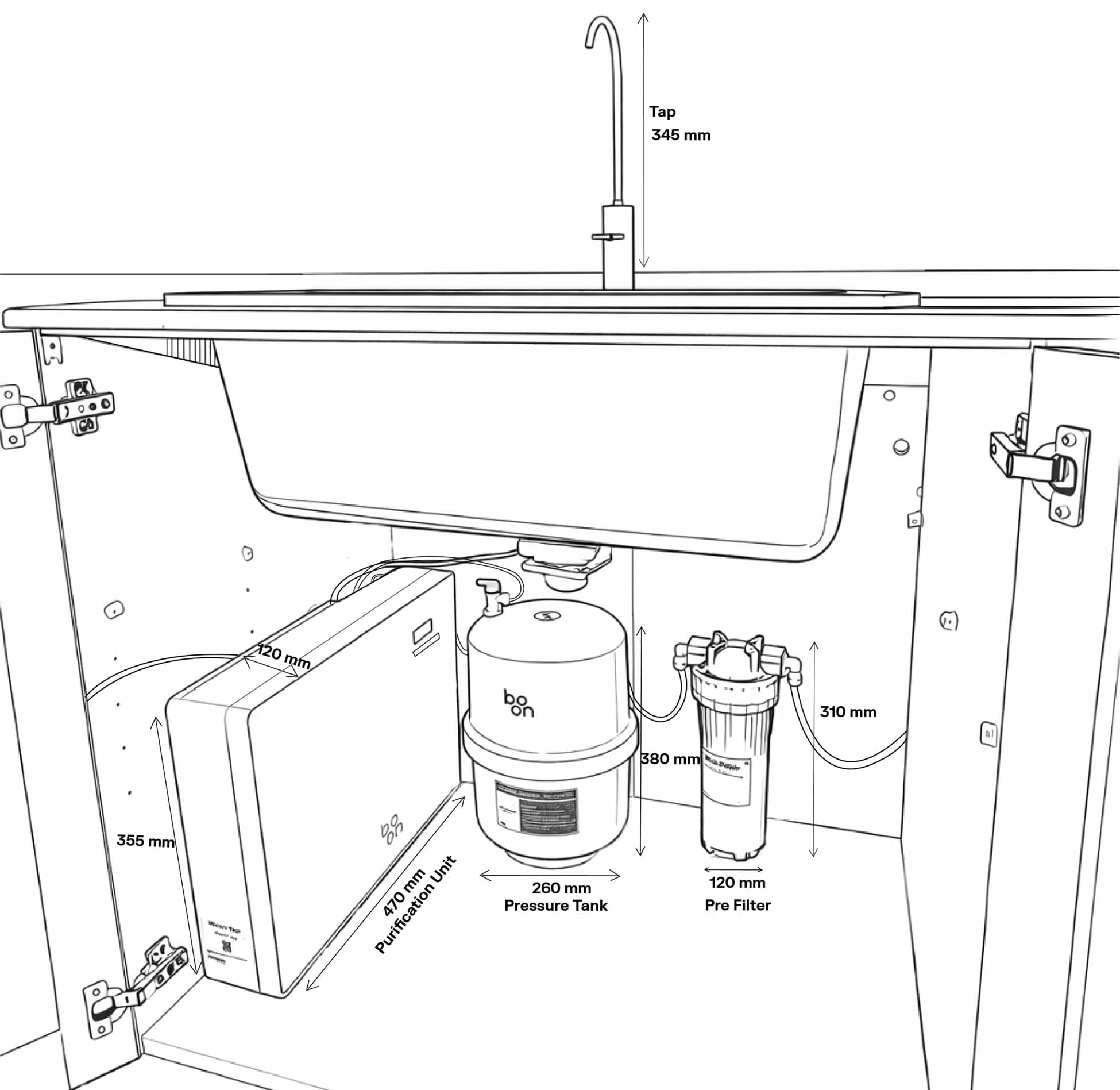
Dimensions of all components
- Purification Unit: 47.0 × 11.0 × 35.5 cm (L × W × H)
- Storage Tank: 24.7 × 33.1 cm (Diameter × Height)
- Tap (Faucet): 41.6 × 15.8 × 34.8 cm (H × W × Spout H), Base: 4.2 × 12.6 cm
- Pre-Filter: 34.2 × 12.9 × 12.9 cm (L × W × H)
Placement
- All components are designed to fit efficiently within standard installation spaces.
- Units can be positioned in multiple configurations based on available space and user preference.
- Placement can be adjusted by interchanging width and depth, provided sufficient clearance is maintained.
2. Plumbing Requirements
- Inlet Water Pipe Size: 3/8 inch
- Tap mounting Hole: 22 mm
- Operating Pressure: 0.03 – 0.20 MPa (0.3 – 2.0 kg/cm²)
- Maximum Feed Water TDS: Up to 1500 ppm
- Drain point should be within 1.5 meters of the installation site
- Tubing should run without sharp bends
- Pre-filter must be mounted before the purification unit
3. Electrical Requirements
- Input Voltage: 230V AC, 50 Hz
- System Voltage: 24V DC, 50W
- Single-phase electrical connection
- Plug point must be within 1 meter of installation area
- Proper grounding is mandatory
- Do not use extension cords
4. Other Requirements
- Indoor installation only
- Ideal inlet water temperature: 10°C – 45°C
- Installation must be performed only by authorized Boon technicians
Installation Guide
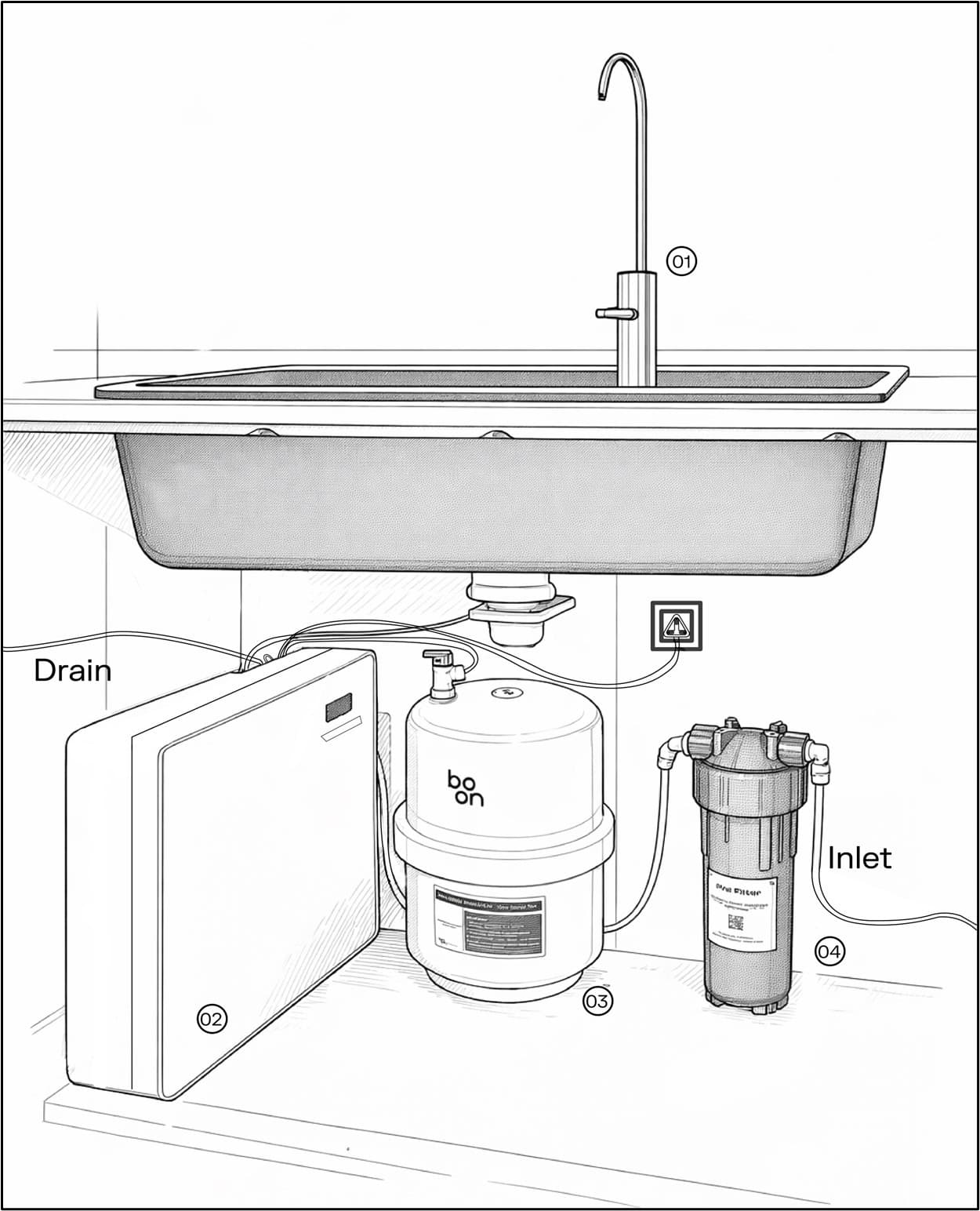
Installation Layout
Installation Prerequisites
- Ensure adequate space is available for the purification unit, storage tank, and tap.
- Ensure that a continuous water supply is available.
- Ensure a drain outlet is available for reject water.
- Ensure a 230V grounded power socket is available nearby.
- Make sure the water pressure is suitable for operation. If the pressure is too high, a PRV can be used; if it is too low, a booster pump is required.
- Ensure a 22 mm hole is available on the countertop for installing the tap.
Installation Procedure
- Begin by placing the purification unit, storage tank, and pre-filter in the installation area on a flat, stable surface.
- Assemble the pre-filter:
- Fix the clamp on the housing using the provided bolt.
- Apply teflon tape on all threaded fittings to prevent leakage.
- Attach the 3/8" fitting to the "inlet" and 1/4" fitting to the "outlet" of the housing.
- Insert the PP filter inside the housing and close it tightly.
- Connect the water supply line to the pre-filter "inlet".
- Connect the blue pipe to the purification unit "Drain/Reject Outlet" port and secure it properly to the drain outlet.
- Connect the pre-filter "outlet" port to the purification unit "inlet" port.
- Attach the valve fitting to the storage tank and place it upright on a flat and stable surface.
- Connect the purification unit "outlet" to the storage tank valve.
- Install the tap on the countertop using the rubber spacer and tighten it securely with the nut.
- Connect the purification unit "outlet" port to the tap.
- For initial flushing of the carbon filter:
- Open the unit and disconnect the carbon filter "outlet" pipe.
- Turn OFF the inlet valve, reconnect the pipe, and then turn the inlet valve ON.
- Allow water to flow until it runs clear, then ensure the pipe is properly connected.
- Plug in the unit and switch ON the power supply and water supply.
- Check all connections carefully to ensure there is no leakage.
- Before first use, flush the system to remove food-grade preservatives from the RO membrane and filters:
- Allow the storage tank to fill completely.
- Open the tap and drain the entire tank.
- Repeat this process 2–3 times. Do not consume this water.
- Ensure all connections are secure and there are no visible leaks.
- A slight taste or odor during initial use is normal and will improve after flushing.
- Once flushing is complete, allow the tank to refill. The purifier is now ready for regular use.
WaterAI™ App
WaterAI™ is the intelligent water management system inside your Boon Tap that continuously monitors, learns, and optimises your water experience.
It tracks real-time water flow, usage patterns, and system performance to provide live insights on both water quantity and operational health. Over time, WaterAI™ learns from usage behavior to help improve efficiency and system awareness.
Key Features
- Real-time monitoring of water flow and dispensing activity
- Live tracking of system performance and operational status
- Insights into daily and long-term water usage patterns
- Alerts for abnormal flow activity or system irregularities
- Smart data insights for improved water management and system awareness
Enhancement Modes
Fine-tune the mineral balance of your water, adapting effortlessly to different consumption and usage needs.

Active
Mineral-rich water for deeper hydration.
Ideal after workouts or when you need enhanced mineral intake.

Daily
Perfectly balanced water for everyday hydration.
Best for regular drinking and daily use.

Bev
Pure RO water for a clean, neutral taste.
Ideal for beverages and cooking.
Cleaning / Flushing Modes
Designed to preserve system hygiene, enhance filter longevity, and maintain consistent water quality over time.

Baby Safe
Delivers enhanced purification for added safety.
Ideal for infants and sensitive consumption needs.

Auto
Automatically manages system care for reliable performance.
Recommended for everyday use to ensure optimal hygiene.

Away
Performs periodic flushing to keep the system fresh.
Best suited for travel or extended periods of non-use.
How to Use Modes
- Open the WaterAI app and navigate to the Modes section.
- Select your preferred mode (Enhancement or Flushing), and the system will seamlessly adjust and operate based on your selection.
Display Codes & System Indicators
Your Boon device communicates its operational status through display codes, on-device prompts, and ambient light indicators, providing clear and real-time information to ensure optimal performance and safe operation.
System Status Overview
| Display Code | Meaning | What You Should Do |
|---|---|---|
| E101 | Water quality is not within optimal TDS range | Check water condition; if it continues, contact service support |
| E105 | Inlet water temperature is higher than normal | Wait for water temperature to return to normal before use |
| INLT | No water is coming into the system | Ensure the water supply is ON and properly connected |
| FLTR | Filter needs replacement | Replace the filter to ensure continued good water quality |
| FLUS | System is performing automatic flushing | No action needed; the system is self-cleaning |
| BOON | System is starting up or initializing | Please wait for the system to complete startup |
Understanding Indicators
Cleaning & Maintenance
Regular cleaning and timely maintenance help to ensure smooth performance of your Boon Tap. Follow the steps below for best results.
1. Exterior Cleaning
- Wipe the outside of the purification unit and storage tank using a soft, damp cloth.
- Keep the installation area clean and dry to avoid dust and moisture buildups.
Recommended Frequency: Weekly
2. Internal Filters & Purification System
This includes pre-filter, sediment, carbon, RO, UV, and mineralization stages.
- Replace filters as per service alerts or when recommended by a Boon authorized technician.
- The purifier uses consumable components including pre-filter, sediment filter, activated carbon filter, RO membrane, UV unit, and mineralization cartridge. The maximum filter life and replacement criteria are declared in the Product Specifications section.
- Actual replacement intervals may vary depending on feed water quality, usage, and operating conditions.
- Filter replacement must be carried out only by authorized Boon service personnel.
- After any filter replacement, ensure the purifier is properly flushed before using.
Recommended Frequency: As per Filter Alerts or Filter Life
3. Pressure Tank Care
- The pressure tank stores purified water and helps maintain steady flow from the tap.
- If the purifier has not been used for 10–15 days, it is recommended to empty the tank once and let it refill with fresh purified water.
- If the water tastes or smells unusual, or if the flow feels weaker than normal, please contact an authorized technician to inspect the tank.
- Any internal cleaning or sanitization of the tank must be done only by trained service personnel.
Storage tank cleaning must be carried out only by an authorized Boon service technician. The technician will drain the tank, bypass the mineralization cartridge, introduce Boon disinfecting solution, allow the tank to refill, keep it idle for disinfection, then fully drain and flush before restoring normal use. Finally, the mineralization cartridge is reconnected to its original position.
Recommended Frequency: Once a year (with annual preventive maintenance)
4. General Care Tips
- Keep all tubing and connections dry and free from bends.
- Avoid using chemical cleaners or spraying water directly on the unit.
- Ensure proper ventilation under the sink and avoid placing heavy items on top of the unit or tank.
Recommended Frequency: As per usage
Safety Reminder
- Always unplug the unit before cleaning.
- Do not open internal components — maintenance must be done by authorized service personnel.
- Use only genuine Boon filters in case of replacement for best performance.
Product Specifications
Technical details and key parameters of the Boon Tap.
| Product Name | Boon Tap |
| Product Type | Under-the-Counter RO Water Purifier |
| Purification Technology | Pre-Filter + Sediment + Activated Carbon + RO + UV + Mineral Cartridge |
| Purification Capacity | 20 LPH |
| Maximum Feed Water TDS | Up to 1500 ppm |
| Recovery Rating | Minimum 40% |
| Installation Type | Under-the-Counter (Below Sink) |
| Purification Unit (L × W × H) | 47.0 × 11.0 × 35.5 cm |
| Storage Tank Capacity | 8 litres (approx.) |
| Storage Tank Dimensions | 33.1 cm (H) × 24.7 cm (Dia) |
| Water Dispensing | Stainless Steel Tap (SS 304) |
| Water Type Dispensed | Normal (Ambient) Water |
| Power Supply | 230V AC, 50 Hz |
| Power Consumption | 50 W |
| Body Material | Plastic with Hardened Glass Front |
| Country of Origin | India |
Filtration Components
The Boon Tap uses a multi-stage purification system consisting of the following components:
- Pre-Filter
- Sediment Filter
- Activated Carbon Filter
- Reverse Osmosis (RO) Membrane
- UV Disinfection Unit
- Mineral Cartridge
Declared Maximum Filter Life (per filter): Up to 12,000 liters
The actual life of the filters and membrane may vary depending on feed water quality (TDS, turbidity, hardness, chlorine and contaminants), daily water consumption, inlet water pressure, and usage pattern and maintenance conditions.
Regulatory Declarations
- The mineral filter used in the Boon Tap does not cause any parameter of the product water to exceed the acceptable limits specified in IS 10500, under recommended operating conditions.
- All component surfaces of the RO system that come into contact with water are made of corrosion-resistant materials or are provided with corrosion-resistant treatment or coating of food-grade quality.
Recommended Feed Water Quality
For optimal performance and long life of your Boon Tap, the input water should meet the following conditions:
| Total Dissolved Solids (TDS) | Up to 1500 ppm |
| Total Hardness | Up to 500 ppm |
| Input Water Chlorine (Max) | 0.2 mg/L |
| Turbidity | Up to 5 NTU |
| Inlet Water Pressure | 0.03 – 0.20 MPa |
| Inlet Water Temperature | 10°C – 45°C |
Warranty
The Boon Tap water purifier is covered by a 2-year limited warranty from the original date of purchase, applicable to manufacturing defects in materials and workmanship under normal domestic or office use.
For full warranty terms, coverage details, exclusions, and service process, please visit the Warranty & Maintenance page.